Prospecting for B2B.
Driven by AI.
Analyze any company, find the right prospects, and generate targeted leads — without switching between tabs.

Features
From company analysis to
clean lead lists in one place.
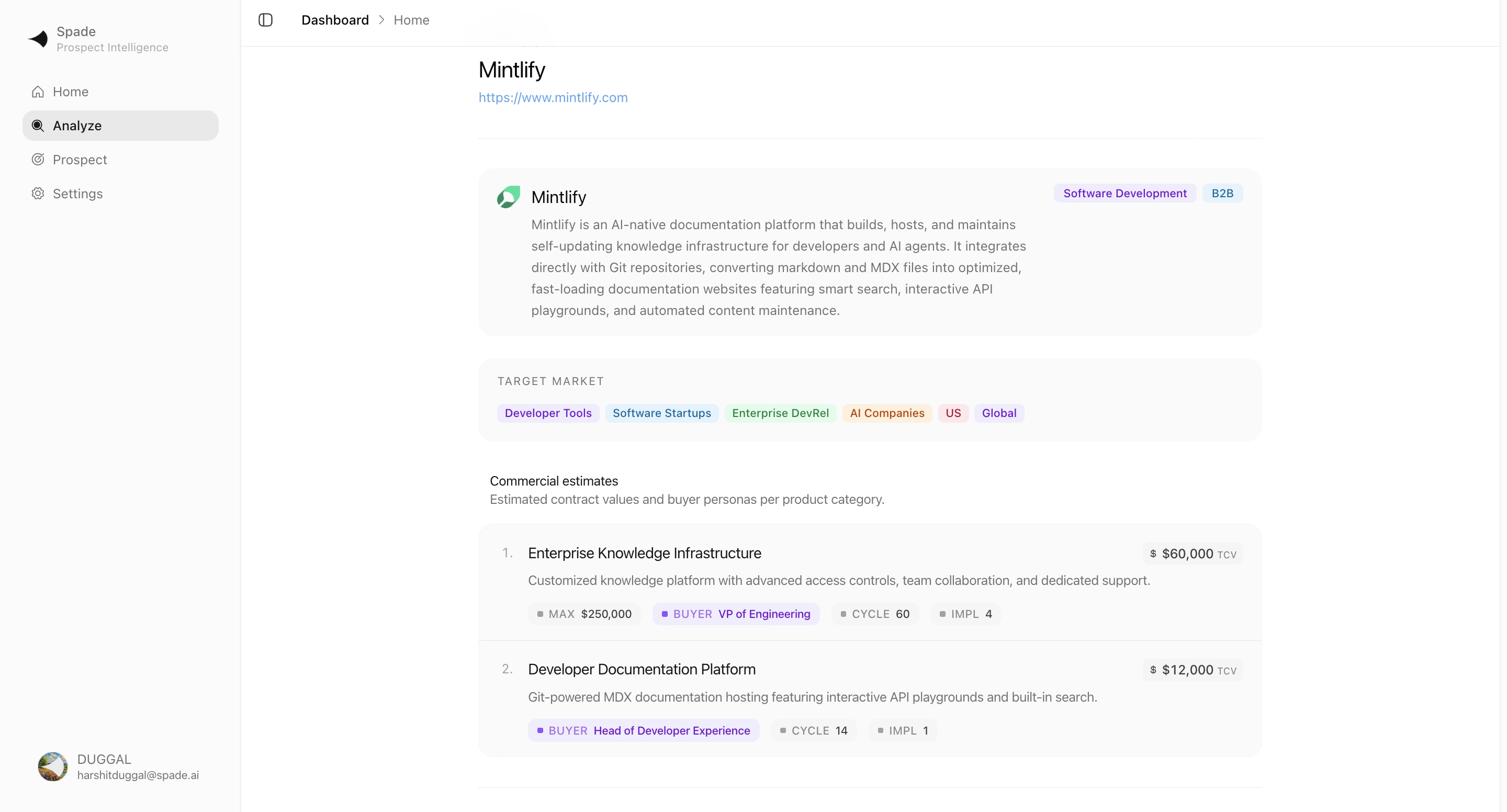
Company analysis from any URL
Enter a website. Spade extracts the industry, business model, ICP, TAM, and buying process using AI and web research.
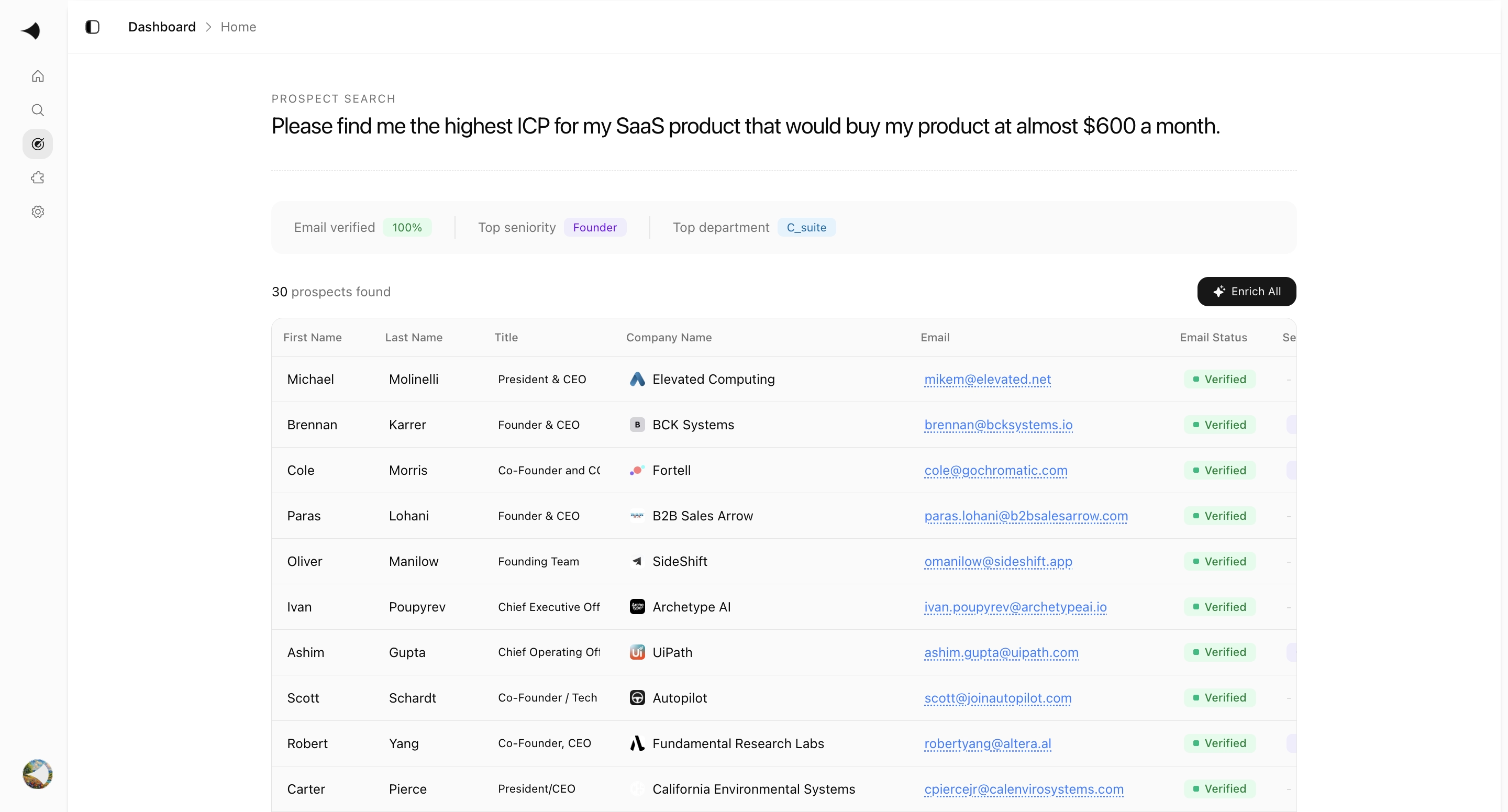
Prospect search in plain language
Describe who you need. Spade converts it into Apollo filters — no manual configuration required.
AI extracts the right filters
The model understands titles, seniority, location, industry, and department. It applies filters based on the company profile.
Structured lead data, no noise
Every lead is normalized with name, title, email, company details, and buying signals. Duplicates removed.
Runs immediately in mock mode
No API key required. Mock mode returns realistic data so you can test the full flow. Switch to live when ready.
Export to CSV
Lead table exports with all columns — ready for your CRM, outreach tool, or spreadsheet.
Most prospecting tools return contacts with no context. Spade analyzes the company first, then finds the right people.
AI extracts filters from the company analysis, queries Apollo, and returns structured data. No tab-switching.
bento grid
Company analysis, prospect generation,
and outbound — one workspace.

James Whitfield
VP of Revenue Operations
fin.ai
Company profile$12.4k closed
34% close rate · $36.2k pipeline
Cal.com
ConnectedHubSpot
Scanned 20s agoClay
ConnectedAirtable
Not connectedCal.com, HubSpot, Clay, Airtable — data stays in sync.
Weekly Prospecting
Automated prospect discovery and outreach generation.
Using {{icp_profile}} as ICP anchor, search the lead database for prospects with active buying or hiring signals within {{signal_window}}.
Score each lead against {{icp_profile}}. Floor at {{min_score}}. Enrich with company research. Generate a personalization note per lead.
Draft one email per qualified lead. Include {{booking_link}} in body and CTA. Hold all sends for manual review.
Repeatable workflows
Schedule recurring prospecting runs built around your ICP.
Describe the deal.
Find who signs it.
Give Spade your product and your price. It returns verified buyers with real intent — not a list filtered by job title.

Data layers that power every prospect search. Built-in, not bolted on.
Prospecting starts with quality data
Every search pulls from enriched contact databases and verified firmographic signals. No cold lists, no guesses.
AI enrichment at every layer
Gemini and Claude run alongside Apollo and Clay to fill gaps — work emails, phone numbers, intent signals, personalization notes.
Sales Navigator prospecting
HubSpot
CRM sync
Airtable
Flexible data layer
Clay
Data enrichment
Claude
AI enrichment by Sonnet 5
Apollo
Email & phone verification
LinkedIn Sales Navigator as a signal layer
Cross-reference prospects against LinkedIn profiles for seniority, department fit, and buying authority before outreach.
Clean exports, every time
HubSpot CRM fields and Airtable schemas are mapped automatically. Your data lands where your team already works.
Frequently Asked Questions
Enter any company URL. Spade uses AI (Gemini) and web research (Exa) to analyze the company's industry, business model, ICP, TAM, pain points, buying process, and sales motion. You get a structured analysis in seconds.
Spade combines your natural language input with the deep company analysis to extract optimal Apollo filters — job titles, seniorities, locations, industries, and more. The AI understands the company profile better than manual browsing.
Any B2B prospect. Specify your target in natural language — "VP of Marketing at SaaS companies in SF" — and Spade returns clean, structured leads with names, titles, emails, company data, and buying signals ready for outreach.
Yes. Spade includes a mock mode that returns realistic, deterministic lead data without any API key. You can test the full flow immediately and switch to live Apollo when ready.
All analysis data is stored locally in your browser by default. No company information is sent to third parties beyond the AI and research APIs you explicitly configure.
Live Apollo data includes verified emails, direct phone numbers, and up-to-date company information. Spade normalizes and cleans every response so you work with high-quality, actionable leads.